



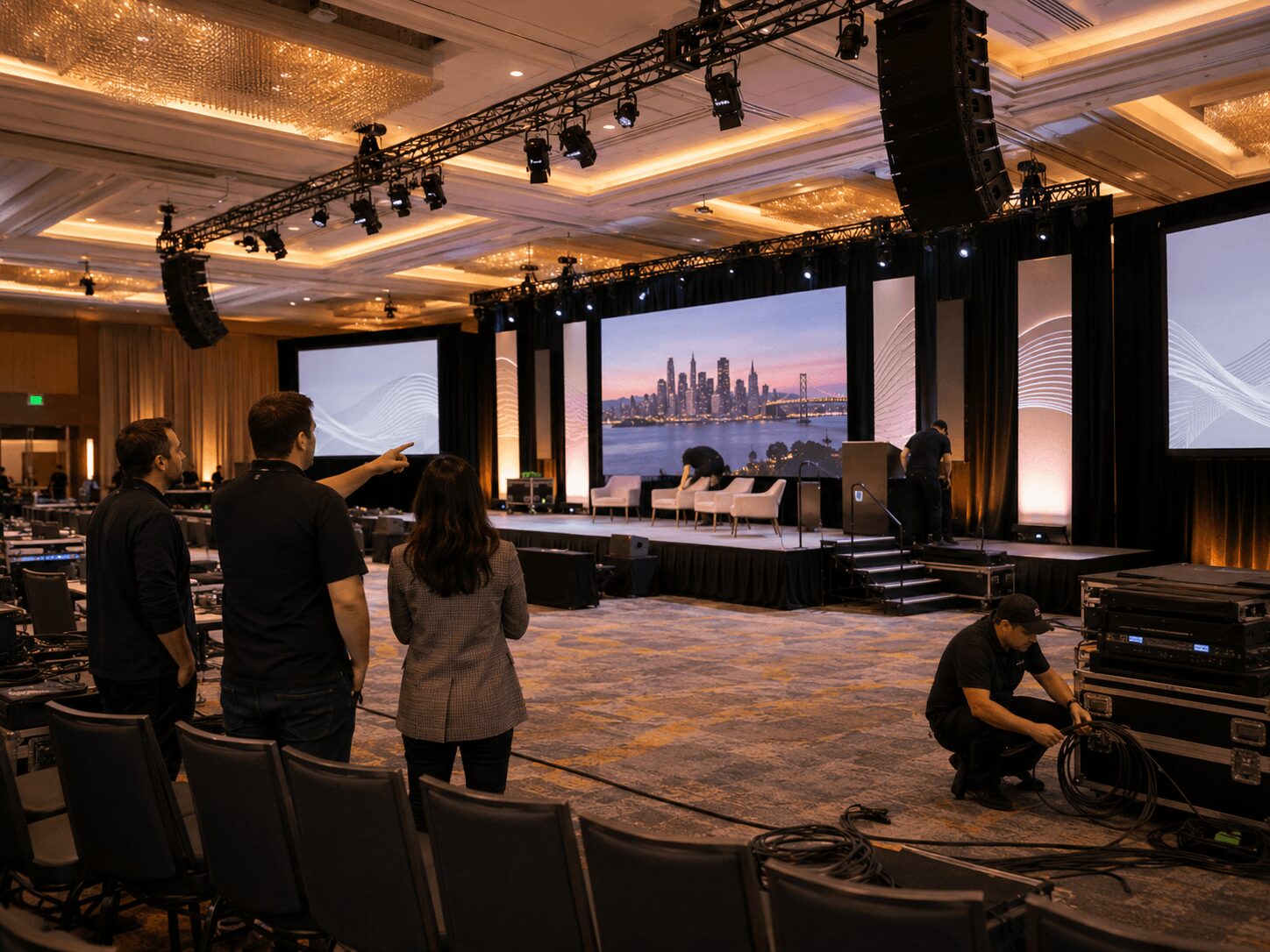
Corporate AV Services Bay Area Event Planners Should Expect
A ballroom goes off schedule faster than most run-of-shows admit. The CEO wants last-minute slide edits, the product team adds a walk-on video, the livestream feed needs a clean program out, and the venue patch sheet still has gaps. That is why corporate AV services Bay Area event planners hire should be judged less by gear lists and more by how the team handles signal flow, timing pressure, and failure prevention.
For conferences, keynotes, product launches, and hybrid events, the Bay Area market tends to be more technical than average. Audiences expect polished screens, clean audio, confident camera coverage, and reliable remote participation. Planners are often supporting executive teams and brand stakeholders who do not care why a system failed. They care that it did. A serious AV partner is there to make sure it does not.
What Corporate AV Services in the Bay Area Should Actually Include
At the corporate level, AV is not just screens, speakers, and some microphones. It is show infrastructure. That usually means pre-production planning, equipment sourcing, system design, labor, setup, operation, strike, and contingency coverage.
A capable provider should be able to handle everything from projection and LED walls to camera switching, recording, livestreaming, graphics playback, confidence monitors, stage audio, and comms. For larger general sessions, video routing and screen management become especially important. If your show has multiple content sources, different display destinations, and a livestream mix running at the same time, you need an operator who understands video processing at a real production level, not just basic switching.
That is where systems like Barco E2 and E3 matter. They are not there for name value. They are there because layered content, multi-screen outputs, fast recalls, and precise scaling are standard requirements at high-end corporate events. If your event includes IMAG, presentation graphics, speaker support, sponsor content, and remote feeds, advanced processing is often the difference between a smooth show and a control room scramble.
For broader reference, Barco Event Master systems are designed for live event image processing and presentation switching, while Barco E2 Gen 2 supports full show control, 4K input capacity, screen management, and flexible layer control for complex event environments.
If you are evaluating a full-service production partner, the most relevant benchmark is whether they can manage the complete chain. That includes event services such as staging, screens, audio, lighting, switching, camera coverage, and technical direction through one coordinated production plan.
The Best AV Teams Start With Workflow, Not Equipment
A common mistake in procurement is starting with an inventory question. Planners ask what cameras, what switcher, what speakers, what LED panels. Those are fair questions, but they come after the real one: how will the show run?
A strong production team will begin by mapping sources, destinations, operators, and dependencies. They will ask who owns content, when decks lock, what aspect ratios are required, whether presenters join remotely, how many playback machines are needed, what confidence support executives require, and whether the webcast gets a separate graphics treatment from the in-room experience.
That planning step matters because corporate shows rarely fail from lack of hardware. They fail from mismatched expectations, unclear responsibilities, and weak technical planning. The right AV partner should push for show calling structure, rehearsal windows, document control, and clear approval paths.
Expect Questions That Feel Operationally Specific
If the AV company asks for your show flow, scenic layout, content deadlines, internet requirements, and presenter format details early, that is usually a good sign. It means they are engineering the event rather than waiting to react on site.
You should also expect discussion around backup plans. Not every event needs full N+1 redundancy across every department. But for executive keynotes, investor-facing events, and hybrid productions, redundancy for playback, switching, recording, audio paths, and streaming transmission is not excessive. It is standard risk management.
Professional AV standards and best practices can also help planners understand how serious providers think about system design, verification, and reliability. AVIXA Standards provide useful industry context around professional audiovisual performance, planning, and documentation.
Livestream and Hybrid Production Should Be Treated as Their Own Show
Many planners still run into vendors who treat livestreaming like an add-on. For corporate events, that approach creates problems fast. The remote audience does not experience the room the way onsite attendees do. They need their own framing, audio mix, graphics, playback timing, and platform coordination.
A real livestream plan covers encoding, platform delivery, return confidence, recording, latency expectations, presenter monitoring, and what happens if the primary internet path drops. It should also account for whether the webcast is public, gated, internal-only, or integrated into a larger virtual platform.
If your event includes remote speakers, panelists, or audience interaction, the technical plan gets more complex. Zoom Webinars, Microsoft Teams, and browser-based guest feeds all behave differently, and each creates different audio routing and monitoring requirements. Platform guidance is useful, but execution on show site still depends on experienced operators.
For software-based live production, vMix is one example of a production and livestreaming platform that can support switching, recording, streaming, and remote contribution when properly configured for the show.
For planners producing hybrid events, it is reasonable to expect a dedicated webcast workflow, not just a split from the room feed. That often includes separate switching logic, stream graphics, record paths, and an operator focused only on the remote output. If webcast quality matters to your stakeholders, treat it like a broadcast deliverable. That is exactly how professional livestream services should be staffed and built.
Venue Familiarity Helps, but Venue Assumptions Are Dangerous
In San Francisco, San Jose, and across Silicon Valley, many corporate venues advertise in-house AV support or existing infrastructure. Sometimes that is enough for a simple meeting. For higher-stakes events, planners should verify what that infrastructure actually means.
A built-in projector does not solve screen size issues. A house sound system does not guarantee clean playback, proper RF coordination, or enough mix flexibility for panel discussions and video roll-ins. Venue internet may be shared, rate-limited, or poorly documented for streaming use. Existing rig points, power access, and backstage pathways can also affect load-in speed and design choices.
For wireless microphone planning, tools such as Shure Wireless Workbench can support frequency coordination and monitoring workflows, but the real value still comes from an audio team that knows how to plan RF, stage inputs, playback, and recording feeds for the room.
An experienced Bay Area production company will know where venue constraints usually show up. Even better, they will still site-check and confirm. Familiarity is useful, but assumptions are expensive.
Expect a Realistic Conversation About Labor and Show Complexity
Not every corporate event needs a large crew. But under-crewing is one of the fastest ways to create show risk. A single operator should not be expected to run room audio, camera switching, playback, and webcast troubleshooting at the same time on a high-visibility event.
Good labor planning reflects actual workload. That may mean a dedicated A1 for stage and playback audio, a technical director for switching, an E2 operator for screen management, camera operators, a livestream engineer, and a technical director or show caller to keep all departments aligned. If a proposal feels lean, ask who is responsible for each function during live cueing, rehearsals, and contingencies.
Switching, Recording, and Show Control Matter
Corporate AV is often judged by what the audience sees, but the control layer is what keeps the event stable. Live switching, camera routing, playback timing, recording, and output management all need to work together.
For compact switching and ISO recording workflows, hardware such as the Blackmagic ATEM Television Studio HD8 ISO can be useful when a show needs live switching with individual input recording. Larger productions may require a different switcher, router, processor, or control architecture, but the planning logic is the same: every source and destination needs to be accounted for before the show starts.
What Planners Should Ask Before Signing Off
Before you approve an AV scope, ask how content will be received, tested, versioned, and played back. Ask whether the room feed and livestream feed are mixed separately. Ask what backup systems are in place for playback, recording, and streaming. Ask who owns comms, cueing, and show calling. Ask how many rehearsal passes are included and whether executive speaker support is staffed.
Also ask how the vendor handles changes after the initial scope. Corporate events change. Session counts shift, scenic requirements evolve, presenters appear late, and branding updates land the night before. You do not need a partner who pretends that never happens. You need one with a process for adapting without destabilizing the show.
For planners with internal production managers, this is where technical credibility becomes obvious. The right team can explain routing, processor use, backup logic, and labor assignments in plain language. They should be able to defend the design without hiding behind jargon.
If your event also requires capture for post-event edits, highlight reels, executive interviews, or recap assets, make sure that is planned from the beginning. Camera placement, audio ISO records, lighting priorities, and file delivery standards all change when video production is part of the scope instead of an afterthought.
What Good Bay Area Corporate AV Feels Like on Show Day
On show day, the best AV operation is quiet in the right ways. You see organized backstage traffic, tested playback machines, labeled signal paths, rehearsed transitions, and a crew that communicates clearly under pressure. Problems still come up. The difference is that they get solved before the audience notices.
That level of execution is usually the result of experienced technical direction, proper prep, and systems built for live conditions. It is not the cheapest path, and it is not always necessary for every meeting. But for public launches, executive communications, customer conferences, and hybrid productions where one missed cue becomes everyone else’s problem, it is the standard worth paying for.
AV Land operates in that part of the market — corporate events where precision matters, redundancy matters, and the production plan has to hold up when the schedule changes at the last minute.
The useful expectation for planners is simple: hire the team that can explain how the show works, how it fails, and how they have already accounted for that. That is usually the clearest sign your event is in capable hands.
AV Land Corporate AV Services in the Bay Area
AV Land supports corporate AV services across the Bay Area for conferences, keynotes, product launches, executive webcasts, hybrid events, general sessions, and business meetings. Depending on the event, our support can include audio, video, lighting, LED walls, projection, livestreaming, recording, camera crew, playback, technical direction, Barco E2 operation, and full signal-flow planning.
For event planners, the goal is not just to rent equipment. The goal is to build a reliable production system that supports the room, the remote audience, the presenters, the brand, and the content your team needs after the event.
Need Corporate AV Services in the Bay Area?
AV Land supports Bay Area corporate events with AV production, livestreaming, video crew, LED wall support, technical direction, recording, and show-day operation.
Contact AV Land to discuss your next conference, keynote, product launch, webcast, or corporate event.
Phone: 415-799-1315
Email: info@av.land
Frequently Asked Questions
What are corporate AV services?
Corporate AV services include the planning, equipment, crew, and technical operation needed for business events such as conferences, keynotes, meetings, product launches, webcasts, hybrid events, and general sessions.
What should Bay Area event planners expect from an AV company?
Event planners should expect pre-production planning, clear communication, equipment matched to the show, experienced operators, backup planning, technical direction, and a workflow that supports both the room and any remote audience.
Does AV Land support livestreaming and hybrid events?
Yes. AV Land supports livestreaming, hybrid event workflows, webcasts, camera switching, audio routing, encoding, recording, and platform coordination for Bay Area corporate events.
Can AV Land support LED walls and screen management?
Yes. AV Land can support LED wall workflows, projection, screen management, Barco E2 operation, video switching, playback, and display routing for corporate events.
What areas does AV Land serve?
AV Land serves corporate events across the Bay Area, including San Francisco, San Jose, Santa Clara, Mountain View, Palo Alto, Sunnyvale, Oakland, and nearby cities.