



Conference Recording Services Bay Area
A keynote can be flawless in the room and still fail on replay if the recording chain was treated as an afterthought. That happens more often than most planners expect. For teams evaluating conference recording services Bay Area, the real question is not whether someone can put cameras in the ballroom. It is whether the production plan will capture usable, on-brand content under live event conditions, with clean audio, reliable records, and file delivery that supports marketing, internal communications, and post-event distribution.
In the Bay Area corporate event market, recording is rarely just archival. Tech conferences, executive summits, product launches, investor updates, and hybrid events all depend on content that can be repurposed after the room goes dark. Session recordings feed demand generation, sales enablement, training libraries, executive messaging, and customer education. If the production team is not thinking about signal flow, backup records, show graphics, confidence monitoring, and final deliverables before doors open, you are taking unnecessary risk.
What Conference Recording Services in the Bay Area Should Actually Include
At a professional level, conference recording means more than hitting record on a switcher output. A proper setup starts with source planning. That usually includes camera feeds, presentation content, playback roll-ins, walk-up speaker audio, panel mics, audience Q and A, and remote guest returns when hybrid elements are in the show.
The recording format should match the content strategy. A general session may need a line cut for speed, ISO records for post flexibility, and a clean program without lower thirds if the content will be re-versioned later. A breakout room may only need a locked-off camera and direct audio record, but even that depends on whether the session is for simple internal reference or external publication.
For many corporate clients, the most valuable recordings are not the flashy open and close moments. They are the panels, technical demos, fireside chats, and leadership sessions that need to look controlled and sound intelligible when watched months later. That places a lot of weight on camera placement, room lighting, presentation capture, and audio routing.
The Biggest Failure Points Are Usually Audio and Playback Capture
Bad video is obvious. Bad audio is fatal. If lavs are rubbing, panel mics are uneven, or audience questions are missing, the footage becomes hard to use no matter how good the camera package looked onsite.
Conference recording services should be built around an audio plan, not added after one. That means taking feeds from the console intelligently, not blindly accepting a matrix out and hoping it works. A record mix often needs different priorities than the in-room PA mix. The room may need more podium reinforcement while the recording needs more presentation laptop playback, cleaner lav presence, and managed panel dynamics.
Presentation capture creates another common problem. If slides, software demos, or product screens are mission-critical, the production team needs to confirm resolution, frame rate, HDCP risks, scaling, and record path in advance. This is where experienced corporate crews separate themselves. A show with multiple screen formats, confidence displays, live IMAG, and streamed outputs needs processing discipline, not improvisation. Complex visual routing often benefits from a dedicated workflow built around systems such as Barco event processors, especially when content has to be distributed reliably across room screens, stream outputs, and records at the same time.
Why Redundancy Matters in Live Conference Recording
Corporate buyers usually understand backup microphones and backup laptops. Recording redundancy deserves the same attention. If one record path fails, do you still have a clean program file? Do you have camera ISOs? Is there an external audio backup? Is the streamed output being archived independently?
There is no single right answer because redundancy depends on budget, show criticality, and the cost of failure. For an internal leadership summit, a single primary program record with audio backup may be enough. For a product launch or flagship user conference, most teams want at least dual recording paths and a show design that prevents one point of failure from killing all usable content.
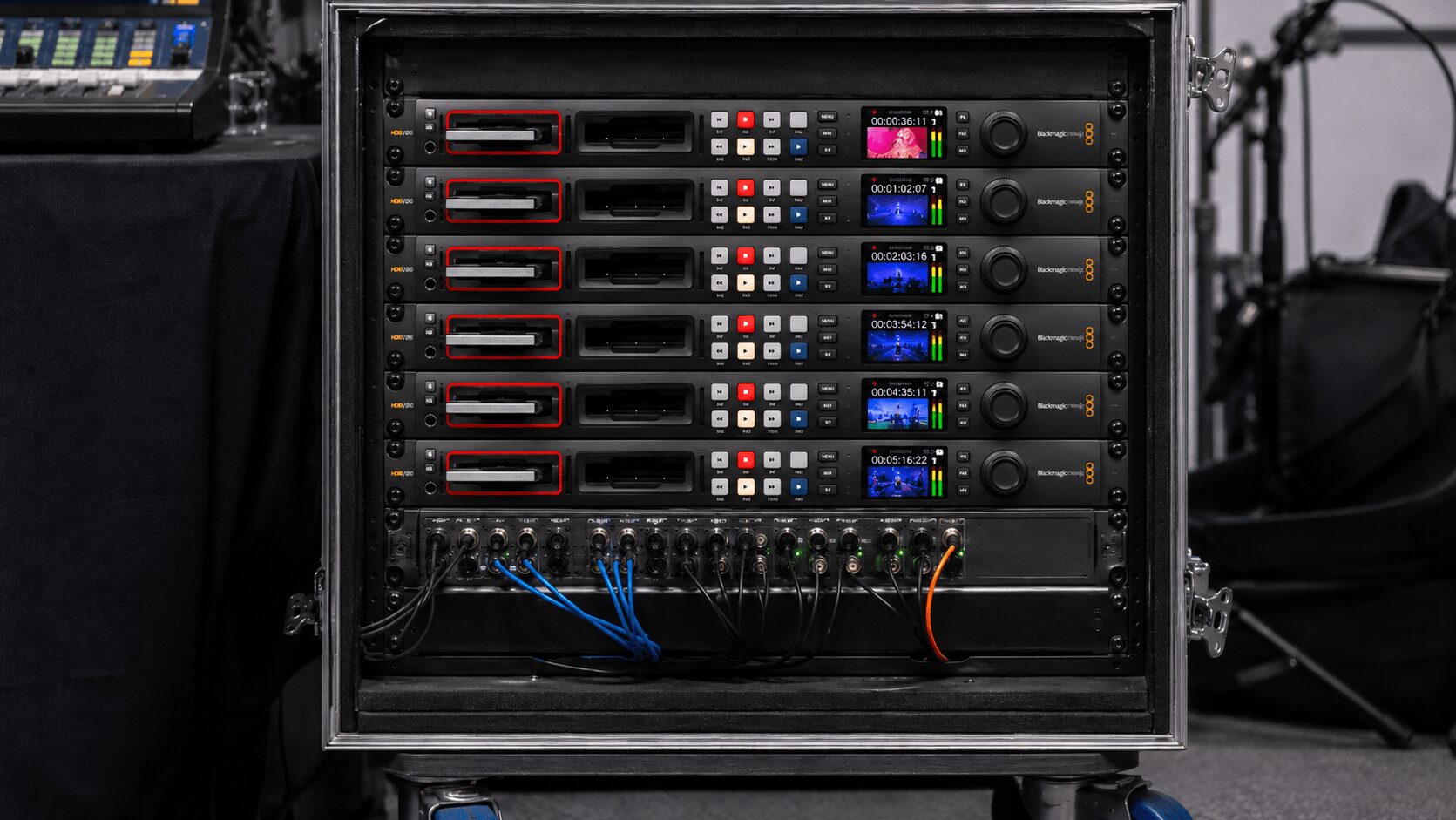
Dedicated hardware recorders are often part of that plan. Products such as Blackmagic Design HyperDeck Studio can be used for broadcast-style recording workflows, while devices such as the AJA Ki Pro GO2 are designed for multi-channel recording to USB media. For higher-end 4K or multi-channel ProRes workflows, the AJA Ki Pro Ultra 12G is another example of a professional recorder that may fit certain show requirements.
That also extends to staffing. A camera package is only as dependable as the operators, shader, audio engineer, and technical director managing it. Recording quality is tied directly to live decision-making. Exposure, framing, cueing, slide transitions, walk-ons, and audience interactions all affect whether the final asset looks intentional or merely documented.
Recording for Archive Is Different from Recording for Content Marketing
This is where many scopes go sideways. Some clients ask for recording when what they really need is usable post-event content. Those are different jobs.
Archive recording is about completeness and reliability. Content-driven recording is about editability, polish, and visual consistency across sessions. If your team plans to cut social clips, executive recap videos, customer stories, or gated session libraries, the production should be designed for that outcome from the start. That may mean additional cameras, cleaner stage lighting, dedicated interview capture, branded lower thirds, and tighter presenter framing.
For teams that want broader content support beyond the live show, it makes sense to align conference recording with a larger video production plan. AV Land’s video production work is built around corporate content requirements, where capture decisions onsite affect what marketing can actually publish later.
Bay Area Venue Conditions Change the Recording Strategy
Conference recording in San Francisco, San Jose, and Silicon Valley venues comes with real-world variables that affect production design. Ballroom ceilings, rigging restrictions, union rules, loading access, ambient noise, and internet reliability all matter. So does agenda density. A multi-track conference at a downtown hotel has different constraints than a campus keynote in a converted warehouse space or a product launch inside a branded temporary environment.
That is why the pre-production process matters so much. Site visits, room diagrams, input and output schedules, show calling plans, and tech rehearsals are not paperwork. They are what prevent last-minute routing problems and missing records.
For hybrid conferences, recording planning also has to account for stream destinations, remote speakers, and platform-specific limitations. Zoom Webinars, Microsoft Teams, and other meeting or webcast platforms can be part of the workflow, but they should not define the quality ceiling of the event. If the content matters, native platform recording is rarely enough on its own. Dedicated production switching and recording workflows create far more control over framing, branding, and file quality.
When Multi-Camera Coverage Is Worth the Cost
Not every session needs a full multi-camera build. But for keynote stages, executive panels, product reveals, and audience-heavy formats, single-camera coverage usually looks thin in playback. It misses reactions, limits edit options, and makes pacing harder to recover in post.
A two- or three-camera setup often gives the best value for conference recording services in the Bay Area. One camera can stay wide and safe, another can live on speaker mediums, and a third can handle audience responses, panel cutaways, or roaming coverage. Add proper shading and coordinated camera ops, and the footage feels intentional rather than surveillance-style.
The trade-off is crew and infrastructure. More cameras mean more signal paths, more comms, more matching, more recording channels, and more coordination with the room design. That is usually worth it for high-visibility sessions, but not always for every breakout. Smart production planning puts the larger build where it actually changes the value of the final assets.
How to Evaluate a Provider Without Getting Buried in Jargon
Ask how they handle audio for recording versus the room. Ask whether they record program only or also ISO feeds. Ask what happens if the switcher record fails. Ask how slides and demo content are captured. Ask who is responsible for file handoff, naming conventions, and delivery timing.
You should also ask who is engineering the show, not just who owns the gear. Corporate conferences are execution-heavy environments. The quality of the recording depends on technical direction, operator judgment, and how the whole room is built. If the provider also handles livestreaming, switching, playback, camera shading, and overall show flow, the recording plan tends to be stronger because the signal chain is being managed as one system instead of several disconnected vendors.
For larger general sessions and hybrid events, that integrated approach matters. AV Land provides broader event services, corporate AV production, and livestreaming services for Bay Area conferences, keynotes, and corporate events.
Price matters, but cheap recording gets expensive when content has to be salvaged. The right scope depends on the business value of the sessions, the number of rooms, the reuse plan, and the consequences of missing key moments.
The best conference recordings do not call attention to themselves. They simply work — clean audio, stable picture, properly captured slides, and files that are ready for the next team that needs them. If your event content has a life after the ballroom, treat the record plan like part of the show, not a box to check. That is usually the difference between footage you store and footage you actually use.
AV Land Conference Recording Support
AV Land provides conference recording services in the Bay Area for corporate events, general sessions, keynotes, executive panels, hybrid events, product launches, and breakout sessions. Depending on the event, our recording workflow can include camera coverage, program records, ISO records, presentation capture, audio integration, livestream recording, hardware recorders, file management, and post-event delivery support.
Our goal is simple: capture the event in a way that is reliable live and useful after the room clears. For corporate teams, that means clean audio, stable video, properly captured content, and a recording plan that matches how the footage will actually be used.
Need Conference Recording Services in the Bay Area?
AV Land supports conference recording, multi-camera capture, livestream recording, hybrid events, technical direction, and corporate AV production across the Bay Area.
Contact AV Land to discuss your next conference, keynote, general session, or executive event.
Phone: 415-799-1315
Email: info@av.land
Frequently Asked Questions
What are conference recording services?
Conference recording services include the planning, equipment, crew, and technical workflow needed to capture conference sessions, keynotes, panels, presentations, and hybrid event content for later use.
Do I need more than one camera for conference recording?
Not always. A simple breakout session may only need one camera and clean audio. Keynotes, panels, product launches, and high-value sessions often benefit from two or three cameras for better coverage and more flexible editing.
What is the difference between program recording and ISO recording?
A program recording captures the live switched output. ISO recording captures individual camera or source feeds separately, giving editors more flexibility after the event.
Is platform recording from Zoom or Teams enough?
Platform recording may be enough for simple internal meetings, but it is usually not ideal for high-value corporate events. Dedicated production recording gives more control over audio, video quality, branding, framing, and file delivery.
Does AV Land provide conference recording across the Bay Area?
Yes. AV Land supports conference recording and corporate AV production across San Francisco, San Jose, Santa Clara, Mountain View, Palo Alto, Sunnyvale, Oakland, and surrounding Bay Area cities.