LiveU Internet Failover Setup That Holds
A keynote goes sideways fast when the primary circuit drops at the exact moment the CEO walks on stage. That is why a solid LiveU internet failover setup is not a nice-to-have on corporate shows. It is part of the transmission design, right next to camera shading, audio routing, and switching logic. If your stream matters to remote attendees, investors, media, or internal teams, failover needs to be engineered before doors open.
For corporate events, the goal is not simply to “have internet.” The goal is to maintain a stable contribution path from venue to platform under changing conditions. LiveU does that well, but only when the unit, the network paths, and the encoder workflow are planned as one system. A bonded transmitter can survive a circuit issue. It cannot fix a weak overall design.
What a LiveU Internet Failover Setup Actually Does
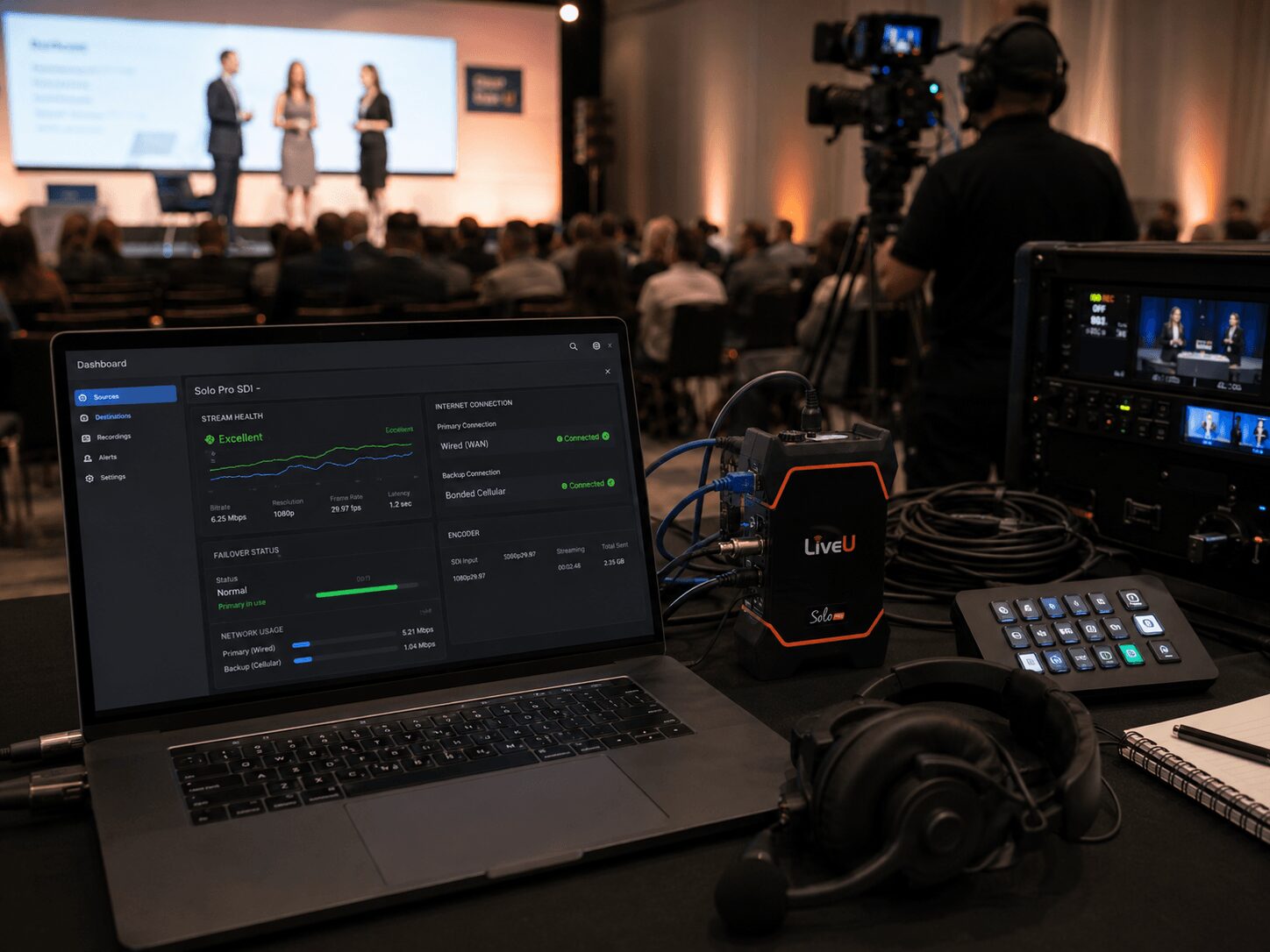
At a technical level, LiveU is not basic internet backup. It is bonding and path management across multiple WAN connections, typically a mix of cellular modems, venue hardline, and sometimes satellite or external broadband devices. Instead of placing all trust in one uplink, the transmitter spreads traffic across several available paths and dynamically adjusts when one path degrades.
That matters because event network failures are rarely clean, total outages. More often, you get packet loss, jitter spikes, bandwidth collapse during attendee load-in, or a venue VLAN that tests fine at noon and falls apart once the expo floor is active. A proper failover design is built for degradation, not just total disconnects.
In practice, that means your LiveU field unit or rack unit is one layer of protection, but not the whole plan. You still need a clean program feed into the encoder, sane bitrate targets, audio confidence monitoring, and a platform path that has been tested under stress.
The Best LiveU Internet Failover Setup Starts With Signal Flow
The most common mistake is treating failover as an internet department problem. In live production, failover starts at the handoff point.
For a keynote, product launch, or hybrid conference, the usual path is program out from the switcher into the encoder or LiveU workflow, then onward to the receiving server or cloud destination. That sounds simple, but there are choices that affect resilience. Are you feeding LiveU directly from a hardware encoder, from a software encoder, or using LiveU as the primary transmission chain with a decoder or cloud ingest on the far end? Are you sending one clean feed or multiple paths? Is comms monitoring available at both ends?
A strong setup keeps the signal path short and intentional. Every unnecessary conversion, unmanaged adapter, or laptop-based workaround becomes another failure point. For corporate shows, we generally prefer dedicated hardware where practical, especially when a webcast is executive-facing or revenue-sensitive.
Choosing Your Paths: Cellular, Hardline, or Both
The right answer is usually both. Venue internet can be excellent, but it is still venue internet. A dedicated wired circuit is useful because it often provides more stable latency and higher sustained throughput than cellular alone. But hardline should not be trusted as the only path, especially in convention centers, hotels, and large campuses where local conditions change throughout the day.
Cellular gives you independence from venue infrastructure. It also brings its own trade-offs. RF conditions vary by building material, room placement, nearby crowd density, and carrier congestion. In downtown San Francisco or a packed San Jose convention environment, one carrier can perform very differently from another depending on the room and the hour.
That is why carrier diversity matters. A good LiveU configuration uses multiple modems across different carriers rather than stacking all confidence on one network. If one carrier gets hammered when attendees arrive, the unit still has other paths to work with.
Bandwidth Is Not the Only Metric That Matters
Clients often ask what upload speed they need. The better question is what consistency they need.
A corporate 1080p stream may not require huge bandwidth, but it does require sustained headroom and predictable behavior. A speed test that shows 50 Mbps up for ten seconds does not prove that your feed will hold during a 90-minute town hall. Packet loss and jitter are often more damaging than raw bandwidth limits, especially on contribution feeds.
Tools such as Speedtest by Ookla can be useful for a quick network check, but a single test result should not be treated as a complete livestream validation. For corporate livestreaming, you still need sustained testing, stream monitoring, and a backup path that can handle real show conditions.
For that reason, bitrate should be conservative relative to your proven uplink capacity. If your combined bonded paths can comfortably sustain the target with margin, your stream is more likely to ride through path loss without visible damage. If you set bitrate too aggressively because the room tested well while empty, the system has less room to adapt once the environment changes.
Hardware Choices Affect Reliability
There is no universal best box, only the best fit for the show. A compact field unit may be enough for a single camera webcast from a breakout room. A larger production with multiple cameras, program records, confidence feeds, and downstream distribution may call for a more integrated transmission and encoding design.
This is where experience matters. If the show also includes switching, graphics, playback, room IMAG, and recording, the internet failover plan has to fit the full production stack. The streaming chain cannot be an isolated afterthought. It needs to live inside the event’s broader redundancy plan.
For reference on platform compatibility and encoding considerations, it helps to review destination requirements from providers like Zoom Webinars and Microsoft Teams before the show build is finalized. Those requirements can affect how you configure the contribution path and confidence monitoring.
For software-based production and streaming workflows, platforms such as vMix and Wirecast may also be part of the chain, depending on the show design, encoder strategy, and destination requirements.
How We Approach LiveU Failover on Corporate Shows
On serious webcast days, we do not rely on a single backup concept. We layer the protection.
The first layer is path diversity through LiveU bonding, usually combining wired internet with multiple cellular carriers. The second layer is encoder planning, which may include a primary and backup encoding path depending on the stakes of the event. The third layer is operational monitoring, meaning an engineer is actually watching transmission health, audio presence, destination confidence, and platform return.
That last piece is where many setups fall short. Failover is not fully automatic just because the bonded unit is smart. Someone still needs to catch a muted source, a platform ingest issue, or a local feed problem upstream of the network. If program audio disappears before the encoder, the cleanest network path in the building will still deliver silence.
For teams evaluating end-to-end support, AV Land handles corporate livestream production as a full system rather than a collection of rented parts. More on that is available through AV Land’s livestream services.
Testing a LiveU Internet Failover Setup the Right Way
A same-day speed test is not enough. You want a controlled preflight and a realistic show test.
The preflight starts with carrier scans, venue circuit verification, and confirmation of physical placement. Cellular antennas buried under a stage or tucked inside a steel backstage room are asking for trouble. Then you validate the actual transmission chain at intended bitrate, resolution, and destination.
The show test should mimic live conditions as closely as possible. That means sending a sustained feed, not just a thirty-second check. If possible, test while the room is active and local devices are online. Watch the LiveU stats, but also watch the stream where viewers will actually see it. A transmission path can look acceptable on paper while the destination platform shows intermittent instability.
LiveU’s product ecosystem is useful for understanding how different units and workflows can fit different production needs, especially for teams that have only used standard encoders before.
Common Failure Points Outside the Internet Path
Not every streaming outage is an uplink outage. We routinely see issues caused by bad SDI handoffs, laptop sleep settings, unstable USB capture paths, mismatched frame rates, or last-minute changes to presentation playback. A bonded transmitter cannot compensate for a shaky source.
Power is another big one. If your network hardware, encoder, and switching core are not on conditioned and protected power, you can lose the show over a local electrical issue that has nothing to do with the ISP. Redundancy works best when it is applied across the chain, not only at the WAN edge.
For larger event builds where streaming, switching, LED, audio, and playback all need to be coordinated under one technical plan, the broader production side matters just as much as the transmission side. That is the difference between having gear on site and having a system that is ready for live conditions. AV Land’s broader event support is available through our event services.
When LiveU Is the Right Answer, and When It Is Not
LiveU is a strong choice when your show needs path diversity, your venue internet is uncertain, or your webcast cannot depend on one uplink. It is especially useful for mobile positions, overflow spaces, fast-turn corporate environments, and venues where requesting a truly dedicated internet circuit is expensive or operationally messy.
It may be more than you need for a low-stakes internal stream in a highly controlled environment with proven network infrastructure and plenty of engineering support. It also does not replace proper destination planning. If the platform itself has ingest limitations, authentication constraints, or a complicated webinar workflow, those issues need to be solved separately.
The key is to match the failover design to the consequence of failure. If the stream is tied to executive messaging, investor communications, lead generation, or a major product launch, the transmission path deserves the same level of discipline as the show call.
A reliable livestream is usually quiet when it works. No one notices the bonded paths, the bitrate decisions, or the redundancy layers. They just see a show that stays up under pressure. That is exactly the point.
AV Land LiveU and Livestream Failover Support
AV Land supports corporate livestreaming, LiveU internet failover setup, hybrid events, executive webcasts, conference sessions, and backup transmission planning across the Bay Area.
Depending on the event, our workflow can include wired internet coordination, LiveU bonding, cellular carrier planning, encoder setup, local recording, destination monitoring, platform coordination, audio confidence, and technical direction. The goal is simple: keep the stream stable and have a realistic backup path ready before the audience notices a problem.
Need LiveU Internet Failover for a Corporate Livestream?
AV Land supports Bay Area corporate livestreams, webcasts, hybrid events, conference sessions, and executive communications with LiveU failover planning, streaming support, recording, and technical direction.
Contact AV Land to discuss your next corporate livestream or hybrid event.
Phone: 415-799-1315
Email: info@av.land
Frequently Asked Questions
What is a LiveU internet failover setup?
A LiveU internet failover setup uses bonded connections across multiple network paths, such as venue hardline and cellular carriers, to help maintain a stable livestream contribution path when one connection degrades or fails.
Is LiveU the same as having backup internet?
No. Backup internet is usually a separate connection. LiveU bonding can combine and manage multiple paths, which can provide stronger resilience than simply switching manually from one network to another.
Do I still need venue internet if I use LiveU?
Often, yes. A strong setup may use both a dedicated venue hardline and cellular paths. Using both gives the production team more path diversity and more options if one connection becomes unstable.
Can LiveU fix bad audio or a bad camera feed?
No. LiveU can help protect the transmission path, but it cannot fix upstream production problems such as bad audio routing, failed SDI handoffs, unsupported frame rates, or unstable source devices.
Does AV Land support LiveU failover in the Bay Area?
Yes. AV Land supports LiveU internet failover setup, livestreaming, hybrid events, webcasts, recording, and corporate AV production across San Francisco, San Jose, Santa Clara, Mountain View, Palo Alto, Oakland, and nearby Bay Area cities.