Event Run of Show Planning for Corporate Events
A keynote can have polished slides, a strong speaker lineup, and an impressive LED wall, then still lose momentum when a walk-on cue is late, a playback source is not ready, or a presenter is standing in the wrong place for the camera.
Event run of show planning is where the event agenda becomes an executable production plan. For corporate conferences, product launches, executive webcasts, and hybrid events, the run of show gives production departments the same timeline, the same cue language, and a defined response when something changes.
A useful run of show does more than list session times. It accounts for what needs to happen before, during, and after each audience-facing moment: presenter movement, microphone handoffs, screen states, confidence monitors, cameras, playback, graphics, lighting, livestream transitions, and stage resets.
The more technically complex the program becomes, the less room there is for assumptions.
Event Run of Show Planning: What to Include
Before getting into individual cues, build the run of show around a consistent structure.
- Clock time
- Estimated duration
- Cue or sequence number
- Segment name
- Show caller instruction
- Stage action
- Video and screen state
- Audio cue or microphone assignment
- Lighting state
- Camera or IMAG requirement
- Graphics or playback cue
- Livestream action when applicable
- Contingency or backup note for critical moments
Not every production needs every column. The goal is not to build the largest spreadsheet possible. The goal is to give each department enough information to prepare for and execute the next cue without guessing.
The Agenda and the Run of Show Are Not the Same Document
The agenda is typically owned by the event or client team. The production run of show is shared by the people responsible for making that agenda happen live.
An agenda might simply state:
9:00 AM — CEO Keynote
A production-ready run of show may need to identify:
- When the CEO is called to stage
- Which microphone is assigned
- What is displayed on the main screen before the walk-on
- Whether an opening video plays before or after the entrance
- Which camera covers the walk-on
- When the lower-third graphic appears
- When the presentation source goes live
- Which confidence-monitor feed the presenter receives
- Who calls each transition
- When the livestream leaves preshow and enters the live program
This distinction matters because an agenda can remain on time while the technical production underneath it becomes disorganized.
A six-minute panel changeover, for example, may appear reasonable on the agenda but become difficult if the crew needs to remove four chairs, change wireless microphones, switch presentation computers, reset lighting, update graphics, clear walk-on music, and reframe three cameras.
Good run of show planning exposes those conflicts before show day.
The Run of Show Is Not a Crew Call Sheet
A crew call sheet tells operators where and when to report. A production schedule tracks load-in, setup, rehearsal, doors, show, and strike. A speaker briefing gives presenters arrival instructions and stage information.
Those documents are useful, but they do not replace the live cue document.
The run of show should be concise enough for a show caller to use under pressure while still giving the technical director, audio engineer, video team, graphics operator, lighting team, stage manager, camera operators, playback operator, and client producer the information they need.
Build the Timeline Backward From the First Live Cue
Start with the moments the audience will see and then work backward to identify everything required to make those moments happen.
A corporate general session might include:
- Doors open
- Walk-in music and screen content
- Show open
- Executive walk-on
- Keynotes
- Videos
- Panels
- Product demonstrations
- Audience Q&A
- Breaks
- Sponsor segments
- Closing remarks
- Walk-out
For a hybrid or streamed program, also account for online-specific moments such as:
- Virtual preshow or holding content
- Remote presenter checks
- Online host introductions
- Remote guest connections
- Streaming-platform transitions
- Online Q&A
- End-of-stream confirmation
Do not think of every agenda item as one isolated line. Most segments have preparation, standby, execution, transition, and reset states.
Give Every Important Cue an Owner and an Expected Result
“Start keynote” is not a useful technical instruction by itself.
It leaves several unanswered questions: What starts first? Who triggers it? Which departments move together? What should the audience see and hear when the cue is complete?
A more usable cue could look like this:
09:00:00 — SHOW OPEN
GO Open Video.
Playback A to main screen and program.
Video audio to house and stream.
Camera 1 holds wide stage.
Lighting GO Open Look.
Stage manager releases CEO at 00:45.
The exact wording will vary from show to show. What matters is that the cue can be rehearsed, understood, and executed consistently.
Keep Show-Caller Language Short
The show caller may already be coordinating audio, lighting, video, cameras, graphics, playback, stage management, and talent movement.
Once everyone understands the sequence, cue language should normally become shorter rather than more descriptive.
For example:
“Standby Video 18, Lights 24, Audio walk-on.”
“GO Video 18 and Lights 24.”
The operators are responsible for understanding what is programmed inside those cues. The caller should not need to describe every layer, source, transition, or routing decision every time a cue fires.
Design the Run of Show Around Signal Flow, Not Only Stage Flow
The audience sees the stage. The production team manages the technical system behind it.
A presenter source may simultaneously feed:
- Main LED wall or projection
- Confidence monitors
- Downstage displays
- Camera program
- Livestream program
- Recording
- Overflow rooms
A simple creative change can therefore affect multiple destinations.
This is why screen management and technical direction should be planned alongside the creative content. A layout that appears simple in a storyboard may require multiple sources, layers, keys, screen destinations, and transitions in the production system.
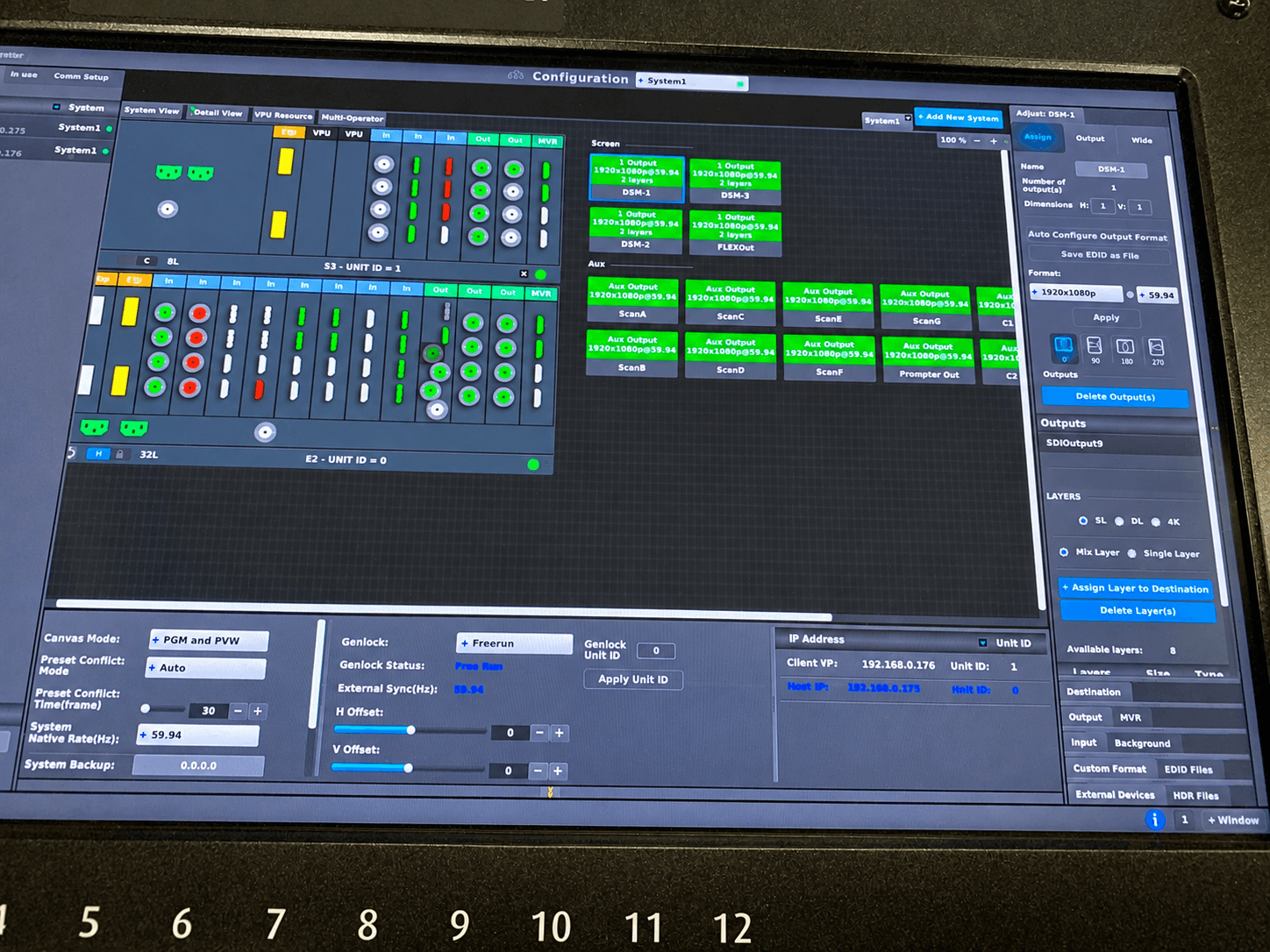
If the show uses Barco E2 screen management, build the required screen states before the live show rather than creating important looks during the program. Barco’s Event Master platform is designed around professional multi-screen presentation and screen-management workflows.
Use consistent source naming across the run of show, show file, patch list, confidence-monitor plan, and operator multiview.
“Presenter Laptop” becomes ambiguous when the system contains four laptops, two playback machines, and a demonstration computer.
Names such as:
- SL-01 Main Deck
- SL-02 Backup Deck
- PB-A Open Video
- PB-B Backup Playback
- CAM-1 Wide
- CAM-2 Podium
reduce unnecessary questions when cues are moving quickly.
Audio Needs the Same Level of Planning
Identify how each presenter enters the audio system:
- Lavalier microphone
- Headset microphone
- Handheld microphone
- Lectern microphone
- Audience Q&A microphone
- Remote conferencing return
Also account for walk-on music, video playback audio, stingers, remote contributors, interpretation feeds, and separate livestream mixes where required.
Many live-event audio problems happen during handoffs and routing changes rather than because a microphone itself fails.
Plan Stage Movement Alongside Technical Cues
A technically correct cue can still fail if the person involved is not ready.
The run of show should account for:
- Speaker call times
- Green-room release
- Microphone fitting
- Walk-on side
- Walk-off direction
- Furniture resets
- Panel seating
- Demo equipment
- Award handoffs
- Audience microphone movement
If a CEO needs 60 seconds to travel from the green room to stage, the stage manager cannot receive that information five seconds before the walk-on cue.
The standby needs to happen early enough for the cue to succeed.
Technical Rehearsal Turns the Run of Show Into a Real Timeline
A run of show should be reviewed and tested before attendees enter the room. A table read helps confirm sequence, but a technical rehearsal validates the production against the actual system.
Use rehearsal to verify:
- Presenter movement
- Microphone handoffs
- Playback timing
- Screen transitions
- Camera framing
- Graphics timing
- Lighting cues
- Confidence-monitor content
- Remote speaker workflow
- Show-caller language
Measure rather than guess.
Time the walk from the green room to stage. Run the product demonstration at the presenter’s normal speaking pace. Play every important video from the actual playback system. Confirm panel-change timing with the actual furniture and microphone plan.
Rehearse the Online Audience Experience Separately
For livestreamed events, the experience in the ballroom and the experience online are related but not identical.
A transition that looks acceptable in the room may create dead air, an incorrect source, or an awkward black frame for remote viewers.
Verify:
- Stream program video
- Stream audio
- Remote presenter return
- Mix-minus routing
- Holding slides
- Caption workflow if used
- Platform permissions
- Backup stream or encoder plan
- Local recording
- End-of-stream procedure
Build Contingency Cues Into the Run of Show
“Backup available” is not a contingency plan.
A useful contingency defines what operators should actually do when something fails.
Examples:
- If the main presentation laptop fails, which backup source goes live?
- If a video does not play, what screen state replaces it?
- If a remote guest disconnects, what does the moderator do next?
- If a product demo computer crashes, is there a backup recording?
- If the program runs 10 minutes late, which segment can be shortened?
- If the livestream connection fails, who makes the decision to activate the backup path?
The answer depends on the event.
A tightly scripted product launch may need redundant playback and prebuilt alternate screen states. A leadership summit may instead have flexible discussion segments that the producer can shorten.
Both need a clear decision-maker.
Keep important contingency notes attached to the cue they affect rather than hiding every backup procedure in a separate document that operators may not have time to locate during a live show.
Control Run of Show Versions Before Show Day
Late changes are normal in corporate events.
A new executive deck, revised speaker order, shortened break, replacement video, or added sponsor message can all be handled when version control is disciplined.
They become dangerous when the run of show, content folder, show file, graphics package, and operator instructions are updated independently.
Establish one person responsible for the master run of show.
When a change arrives:
- Confirm what changed.
- Update the master ROS.
- Update affected technical departments.
- Verify the new content or timing.
- Update programmed cues if necessary.
- Confirm everyone is using the current version.
A replacement video that is 20 seconds longer can change the next presenter release, walk-on timing, graphics cue, and overall session length.
Small content changes can have production consequences.
Make the Run of Show Easy to Read Under Pressure
The best run of show is not the most elaborate spreadsheet. It is the one people can use while the show is moving.
Keep the document consistent:
- Use one clock format throughout.
- Keep segment naming consistent.
- Separate standby cues from GO cues.
- Keep technical notes concise.
- Do not rely exclusively on color coding.
- Avoid paragraphs inside cue cells.
- Freeze or repeat important header rows when appropriate.
- Clearly display the current revision.
One person should own final updates, but the people executing the cues should review their sections.
If an operator asks, “What happens next?” during rehearsal, that is useful feedback. The cue structure may need clarification.
Final Event Run of Show Planning Checklist
Before doors open, verify that the run of show agrees with the actual production.
- Final presenter order confirmed
- Final content versions loaded
- Video durations verified
- Microphone assignments confirmed
- Playback cues tested
- Screen states programmed
- Camera assignments understood
- Graphics loaded and spelled correctly
- Lighting cues confirmed
- Confidence-monitor requirements checked
- Stage entrances and exits confirmed
- Remote contributors tested
- Livestream program verified
- Backup sources tested
- Contingency decisions documented
- Show caller and department leads using the same ROS version
- Critical transitions rehearsed
- Doors-open and show-open cues clearly defined
A Good Run of Show Creates a Shared Production Rhythm
When the room fills, the run of show becomes more than a schedule.
Every useful standby gives an operator time to prepare. Every precise GO cue keeps multiple departments moving together. Every documented contingency reduces the amount of improvisation required when something changes.
That is the practical value of event run of show planning: fewer assumptions, cleaner communication, faster decisions, and a corporate program that remains controlled even when the original schedule does not.
Need Help Planning a Corporate Event Production?
AV Land supports corporate conferences, general sessions, executive presentations, livestreams, hybrid events, and technically complex productions throughout the San Francisco Bay Area and beyond.
We can help with technical planning, video systems, screen management, cameras, livestreaming, show control, and onsite production.
Contact AV Land to discuss your next event.
Event Run of Show Planning FAQ
What is a run of show for a corporate event?
A run of show is the live production timeline used to coordinate the sequence of an event. It can include timing, presenter movement, audio, video, lighting, graphics, cameras, playback, livestreaming, and other technical cues.
How is a run of show different from an event agenda?
An agenda tells attendees what is happening and when. A production run of show explains how the production team will execute those moments, including standbys, GO cues, department responsibilities, transitions, and technical requirements.
Who should own the run of show?
One person should control the master version, typically a producer, show caller, or another designated production lead. Department leads should review the portions that affect their work before the live event.
How detailed should a run of show be?
It should contain enough information for each department to understand and prepare for the next cue without forcing the show caller to read long technical descriptions during the event. Complex moments require more detail than routine transitions.
Should every technical cue be included?
Major audience-facing and coordination-sensitive cues should be documented. Individual departments may also maintain more detailed cue lists for their own systems, such as lighting, audio, playback, or screen-management presets.
When should the run of show be finalized?
The structure should be developed early enough to guide technical planning and rehearsal. Corporate events often continue changing close to show time, so the more important goal is disciplined version control and clear communication of every approved revision.
Should backup plans be included in the run of show?
Critical contingencies should be visible where operators can use them quickly. Examples include backup presentation sources, alternate playback, remote-speaker failure plans, timing adjustments, and livestream recovery procedures.