



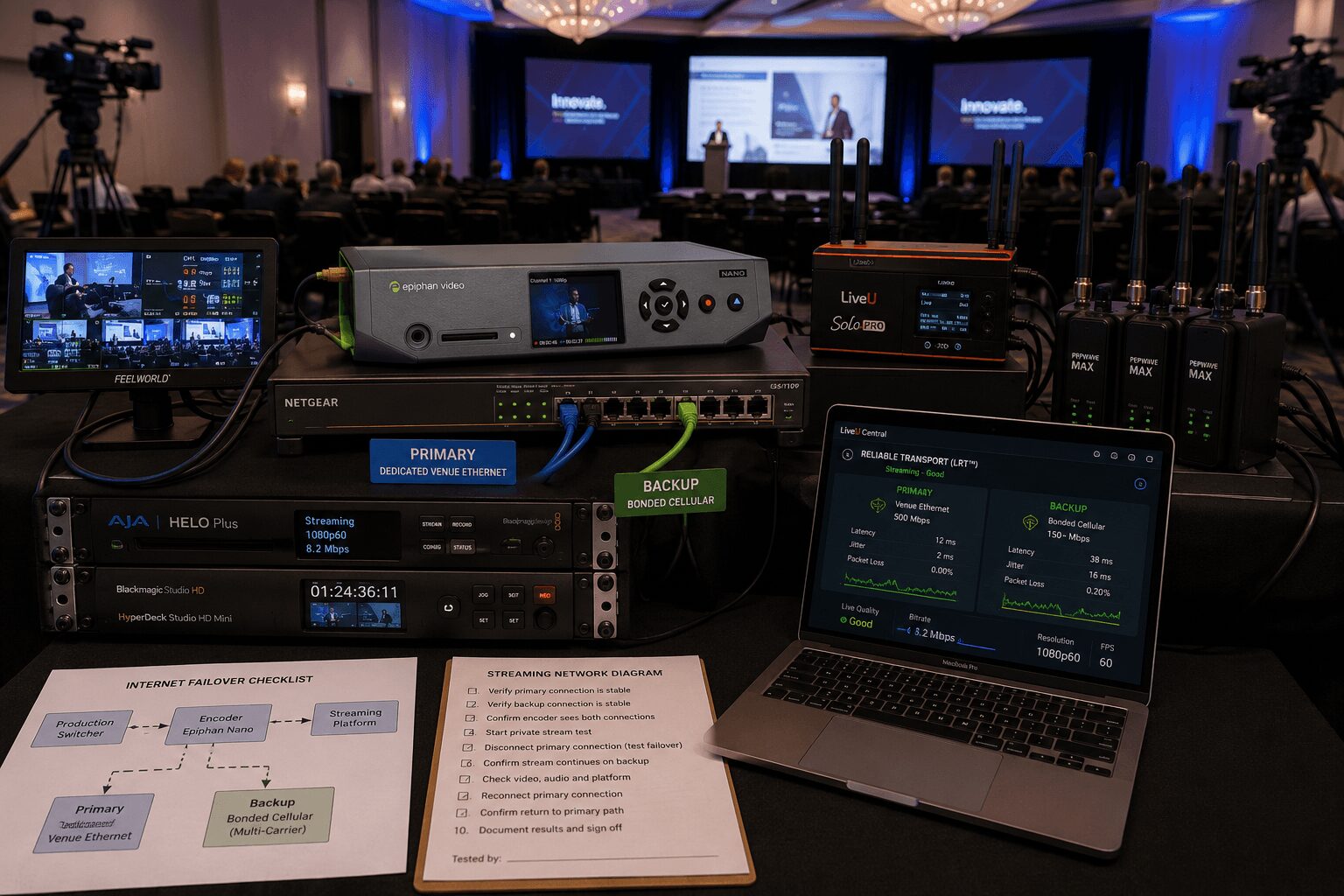
Redundant Internet for Livestreams That Holds Up
Redundant internet for livestreams should be designed as part of the production signal path—not added after the cameras, switcher, encoder, and streaming platform have already been selected.
A livestream can have excellent cameras, clean audio, professional switching, and a rehearsed run of show, then fail because one network path drops at the wrong moment.
That does not mean every webcast needs an expensive multi-carrier bonding system. It means the internet design should match the consequence of interruption.
A short internal update for a limited audience has different requirements from an investor webcast, executive keynote, public product launch, or hybrid conference that cannot be repeated.
The right plan answers five questions:
- What is the primary internet path?
- How independent is the backup path?
- How will traffic move between the two?
- Who monitors and activates the recovery?
- What happens to the program if every live connection fails?
Redundant internet for livestreams at a glance
- Define the stream: Platform, resolution, frame rate, codec, bitrate, destinations, and expected duration
- Choose the primary path: Prefer a dedicated wired circuit with documented service and venue IT support
- Add path diversity: Use a separate carrier, bonded cellular system, alternate ISP, or other truly independent connection
- Select the transport method: Decide between manual failover, automatic failover, load balancing, or true connection bonding
- Separate critical systems: Keep streaming traffic isolated from attendee Wi-Fi and nonessential production traffic
- Test sustained performance: Monitor upload capacity, latency, jitter, packet loss, and stability over time
- Test each path separately: Confirm that the stream can run on the primary and backup connections independently
- Test the failure: Disconnect or disable the primary path and observe the real handoff
- Monitor during the show: Assign an operator to watch encoder, connection, platform, audio, video, and return health
- Record locally: Protect the final asset with a local program record and additional records where required
Why one internet connection creates a live-production risk
A dedicated hardline is usually the preferred primary connection for a corporate webcast. It is typically more controllable than guest Wi-Fi, easier to document, and less exposed to attendee devices.
But a dedicated circuit is still one path.
Possible failures include:
- A venue switch reboot
- A disconnected network cable
- An incorrect VLAN or port configuration
- A firewall or security-policy change
- A captive portal or expired device registration
- A carrier outage
- An upstream routing problem
- DNS failure
- Congestion or traffic shaping
- A damaged cable or network interface
- Loss of power to venue network equipment
A stream does not need to go completely offline to become unusable.
Increasing packet loss, unstable latency, jitter, or reduced upstream capacity can create:
- Video artifacts
- Audio interruptions
- Dropped frames
- Buffering
- Reduced image quality
- Encoder reconnection
- Platform disconnects
For an executive webcast, leadership presentation, or investor-facing program, even a brief interruption can become a visible business problem.
What redundant internet actually means
Having two internet connections does not automatically create redundancy.
If both connections depend on the same building switch, firewall, ISP, fiber entrance, electrical circuit, or network-management system, one failure may affect both paths.
Useful redundancy requires as much independence as practical.
That may include:
- A dedicated venue circuit from one ISP
- A secondary wired circuit from another ISP
- A bonded cellular system using several carriers
- A managed 5G or LTE router on a separate carrier
- A satellite connection where appropriate
- A connection located outside the venue network infrastructure
The two paths should also use separate physical network interfaces or a properly configured bonding or failover appliance whenever possible.
Path diversity matters more than connection count
Consider these examples:
- Weak redundancy: Two Ethernet ports connected to the same venue switch and internet circuit
- Better redundancy: One venue hardline and one cellular connection
- Stronger redundancy: One dedicated venue circuit plus a bonded cellular system using multiple carriers
- Higher-level architecture: Independent wired circuits, bonded cellular, backup encoding, local recording, and staffed monitoring
The correct level depends on audience size, event visibility, budget, venue limitations, and whether the content can be repeated.
Failover, load balancing, and bonding are different
These terms are often used interchangeably, but they describe different network behaviors.
Manual failover
The primary internet connection carries the stream. If it fails, an operator manually changes the encoder, computer, router, or network interface to the backup connection.
Advantages:
- Simple architecture
- Lower equipment cost
- Clear operator control
Limitations:
- Requires fast detection
- May interrupt the stream
- May require the encoder to reconnect
- Depends heavily on operator readiness
Automatic failover
A router or network appliance monitors the primary connection and shifts traffic to a backup path after detecting failure.
Advantages:
- Faster than manual intervention
- Reduces operator workload
- Can protect several connected devices
Limitations:
- The public IP address or network session may change
- The encoder or platform may still reconnect
- Detection thresholds can create a delay
- A degraded connection may remain technically online and prevent failover
Load balancing
Load balancing distributes different network sessions across multiple connections.
It can improve overall network utilization, but it does not necessarily combine several links into one resilient video-upload session.
A single streaming connection may remain assigned to one internet path unless the router, encoder, transport protocol, and service are specifically designed to divide that stream.
Connection bonding
Bonding uses compatible hardware, software, and a receiving or cloud service to divide and manage video data across several internet connections.
If one connection weakens or fails, the remaining paths continue transporting the stream.
This can provide smoother continuity than conventional failover, especially in locations where no single connection is consistently strong.
Systems such as LiveU Solo Pro use LiveU Reliable Transport to support bonded wired, Wi-Fi, and cellular connections for live-video contribution.
Bonding still requires testing. It does not create unlimited bandwidth, and several cellular modems connected to the same carrier may share the same congested infrastructure.
Start with the outgoing stream requirements
Do not begin internet planning by asking only how fast the venue connection is.
First define:
- Streaming platform
- Resolution
- Frame rate
- Video codec
- Audio codec
- Target video bitrate
- Audio bitrate
- Number of simultaneous destinations
- Expected program duration
- Return-monitoring requirements
- Remote-contributor traffic
- Platform-control traffic
A 1080p stream may use a video bitrate in the general range of several megabits per second, but the correct setting depends on platform requirements, content motion, encoder quality, frame rate, and delivery workflow.
Do not build the internet requirement from a generic bitrate number alone. Confirm the current specifications of the actual platform and encoder being used.
Available upload should exceed the target bitrate
A stream configured for a particular bitrate should not operate on a connection that barely reaches that number during one speed test.
Additional capacity is needed for:
- Protocol overhead
- Bitrate variation
- Network fluctuation
- Platform communication
- Audio
- Encoder control
- Confidence monitoring
- Remote contributors
- Other approved production traffic
The production team should establish a minimum acceptable margin for the event rather than relying on one universal multiplier.
A stable connection with predictable performance is usually more useful than a connection that produces one high speed-test result but fluctuates sharply during sustained use.
Measure more than upload speed
A speed test is useful, but it does not describe the complete health of a streaming path.
Monitor:
- Sustained upload capacity: Can the connection carry the intended stream for the required duration?
- Latency: How long does data take to reach the destination?
- Jitter: How much does latency vary?
- Packet loss: How much data fails to arrive correctly?
- Stability: Does performance change over several minutes or hours?
- Route behavior: Does traffic consistently reach the intended ingest location?
- Connection recovery: What happens after a brief interruption?
The best test is a private stream using the actual encoder, settings, platform, and network path planned for the event.
Primary connection checklist
For a venue-provided hardline, confirm:
- Dedicated or shared service
- Committed or best-effort bandwidth
- Upload and download capacity
- Static or dynamic IP addressing
- DHCP requirements
- VLAN assignment
- Firewall restrictions
- Required open ports and protocols
- Captive portal or device registration
- Traffic shaping
- Venue IT support hours
- Escalation contact during the event
- Physical demarcation point
- Switch and power dependencies
- Whether the service is shared with other event rooms
Ask whether “dedicated” means a dedicated wall port, dedicated VLAN, dedicated bandwidth allocation, or physically separate internet service. Those are not the same thing.
Backup connection checklist
For the backup path, document:
- Connection type
- Carrier or ISP
- Whether it is independent of the primary path
- Expected upload capacity
- Data-plan limitations
- Throttling or deprioritization risk
- Device power
- Antenna placement
- Network interface
- Failover or bonding method
- Operator responsible
- Test results
Cellular backup considerations
Cellular performance can change as the room fills, nearby events begin, or the local network becomes congested.
Confirm:
- Which carriers perform well at the venue
- Whether several modems use genuinely different carriers
- Signal quality at the actual equipment location
- Antenna placement
- Building materials that may reduce RF performance
- Data limits
- Thermal management
- Power and battery runtime
Signal bars alone do not prove that a cellular connection can sustain the required upstream traffic.
Do not treat a phone hotspot as full redundancy
A phone hotspot can be useful for remote control, emergency communication, platform access, or a last-resort reduced-bitrate stream.
It should not automatically be treated as equivalent to a professional bonded or managed cellular system.
A phone may:
- Overheat
- Lose power
- Receive a call or notification
- Be deprioritized by the carrier
- Change network modes
- Lose signal
- Provide limited Ethernet connectivity
Separate streaming from nonessential traffic
Do not place critical streaming traffic on the same uncontrolled network used for attendees, staff downloads, cloud backups, software updates, and general internet access.
Whenever practical:
- Use a dedicated wired network interface for the encoder
- Separate streaming and control traffic
- Use managed switches
- Document IP addresses
- Disable unnecessary cloud synchronization
- Disable automatic software updates
- Prevent unauthorized devices from joining the production network
- Keep attendee Wi-Fi separate
A production computer should not begin uploading files or installing an operating-system update while it is encoding the event.
Build the internet paths into the production architecture
A typical corporate livestream path may look like this:
Cameras and presentations → production switcher → program output → encoder → managed network path → streaming platform
The backup design may add:
- A secondary encoder
- A second network interface
- An automatic failover router
- A bonded transmission device
- A second platform ingest
- A cloud receiving service
- A separate local program record
Every component should have a clear owner.
The streaming engineer should know whether a failure belongs to:
- The video program
- The encoder
- The local network
- The venue internet circuit
- The backup connection
- The transmission service
- The streaming platform
- The viewer-side delivery system
Protect the physical network path
Network redundancy can still fail because of basic physical problems.
Confirm:
- Ethernet cables are tested and labeled
- Connections are strain-relieved
- Cables are protected with ramps where required
- Critical connectors cannot be kicked or removed accidentally
- Network switches have protected power
- Backup devices remain powered
- Cellular antennas are positioned correctly
- Devices have adequate ventilation
- Spare Ethernet cables and adapters are available
A backup cellular device that is switched off in a case is not ready for failover.
Internet testing procedure before the event
1. Test from the actual encoder location
Do not rely on a speed test performed in the venue office, lobby, or another ballroom.
Connect from the planned streaming position using the actual cabling, switch, firewall configuration, and network interface.
2. Test each connection independently
Run the stream using only the primary connection.
Then disconnect the primary and run the same stream using only the backup path.
Confirm that each path can carry the program by itself if that is part of the recovery design.
3. Run a sustained private stream
Use:
- The real encoder
- The intended resolution
- The intended frame rate
- The intended codec
- The intended bitrate
- The real platform or approved test destination
Run the test long enough to observe stability rather than checking only the first few seconds.
4. Verify audio and video at the destination
Watch and listen to the platform return from a separate device and connection.
Check:
- Video quality
- Audio quality
- Lip synchronization
- Graphics readability
- Latency
- Platform status
- Viewer experience
5. Force the failure
Physically disconnect or disable the primary internet path while the private stream is running.
Observe:
- Whether the encoder remains connected
- Whether the platform session stays active
- How long the transition takes
- Whether viewers see buffering or interruption
- Whether audio drops
- Whether the operator receives an alarm
- Whether the primary path recovers cleanly
Do not assume automatic failover works because a router interface labels it as enabled.
6. Test the recovery procedure
Confirm who:
- Identifies the failure
- Notifies venue IT
- Changes the connection
- Reduces bitrate if required
- Switches to the backup encoder
- Communicates with the producer
- Updates the client
- Confirms viewer recovery
Test again when the venue is active
An empty ballroom and a full conference may produce different network conditions.
Before show time, verify:
- Primary path online
- Backup path online
- Bonded connections active
- Encoder publishing to the correct destination
- Platform event configured correctly
- Return monitoring available
- Local records ready
- Venue IT contact reachable
Cellular performance should be checked again after attendees and neighboring events are active.
Assign someone to monitor the stream
A livestream should not be started and ignored.
The streaming engineer, technical director, or another assigned operator should monitor:
- Encoder status
- Outgoing bitrate
- Dropped frames
- Connection status
- Packet loss where available
- Bonded-link contribution
- Platform ingest health
- Audio meters
- Video program
- Confidence return
- Local records
The operator should have direct communication with:
- Video control
- Audio
- Producer or show caller
- Venue IT
- Remote-contributor operator
- Platform administrator
AV Land integrates network monitoring with the complete camera, switching, audio, encoding, and show-control workflow rather than treating the internet connection as an unrelated venue service.
Always protect the recording
Internet redundancy protects the live audience. Local recording protects the final asset.
Depending on the event, record:
- Program video
- Clean presentation feed
- Individual camera feeds
- Program audio
- Audio multitracks
- Remote contributors
A platform recording should not automatically be treated as the only master recording.
If the platform or internet fails, local records can support:
- On-demand publishing
- A repaired replay
- Post-event distribution
- Client archives
- Edited program delivery
Match redundancy to the event risk
Lower-risk internal webcast
A reasonable design may include:
- Tested wired venue internet
- Separate 5G backup
- Manual or automatic failover
- Local program recording
- One assigned stream operator
Executive keynote or hybrid conference
A stronger design may include:
- Dedicated hardline
- Multi-carrier bonded cellular
- Managed failover or bonding
- Primary and backup encoding
- Local program and audio records
- Dedicated stream monitoring
Investor event or public product launch
The architecture may justify:
- Two independent wired services where available
- Bonded multi-carrier cellular
- Separate primary and backup encoders
- Independent power protection
- Multiple platform or distribution paths
- Local program and ISO recording
- A dedicated streaming engineer
- Documented client communication and recovery procedures
These are examples, not universal packages. The system should follow the actual consequence of interruption.
Common redundant-internet mistakes
Assuming venue Wi-Fi is sufficient
Guest Wi-Fi is commonly shared, uncontrolled, and affected by attendee use.
Calling two ports redundant
Two Ethernet ports may still rely on the same switch, circuit, firewall, and ISP.
Confusing load balancing with bonding
Distributing separate sessions across two links does not necessarily protect one continuous stream.
Testing only with a speed-test website
A speed test does not prove sustained streaming performance or successful platform delivery.
Never forcing a failover
A backup procedure that has not been activated during testing remains an assumption.
Using several modems from one carrier
Those modems may share the same congested cellular infrastructure.
Keeping the backup device switched off
Recovery will be slower and may expose configuration, power, login, or thermal problems.
Leaving the stream unmonitored
Platform or connection degradation may continue for several minutes before anyone notices.
Relying only on the cloud recording
A platform-side failure can compromise both the live stream and its archive.
Need reliable internet and livestream production?
AV Land provides multi-camera livestream production, hardware encoding, bonded cellular workflows, local recording, technical direction, and corporate event production throughout the San Francisco Bay Area.
We plan the cameras, switching, audio, encoding, network paths, platform delivery, monitoring, and records as one production system.
Learn more about our corporate livestream production services and our comparison of Pearl Mini and LiveU workflows.
Send us your event date, venue, audience size, platform, stream requirements, production schedule, and budget range to begin planning the webcast.
Frequently asked questions
How many internet connections should a livestream have?
There is no universal number. A lower-risk webcast may use one dedicated hardline and one tested cellular backup. A higher-risk event may use independent wired services plus multi-carrier bonded cellular. Path independence and tested recovery matter more than connection count alone.
Is venue Wi-Fi safe for a professional livestream?
Shared guest Wi-Fi should not normally be the primary connection for a high-stakes webcast. A dedicated hardline or professionally managed connectivity solution provides greater control. Venue Wi-Fi may still serve as a secondary or noncritical connection after testing.
What is the difference between failover and bonding?
Failover moves the stream from a primary connection to a backup after a problem is detected. Bonding actively manages one stream across several connections so the remaining links can continue carrying traffic when one path weakens or fails.
Does connecting Ethernet and Wi-Fi to a laptop create bonding?
Not by itself. The operating system may select one interface or use different interfaces for separate sessions. True bonding requires compatible transport software, hardware, and usually a receiving or cloud service designed to recombine the traffic.
How much upload speed does a livestream need?
The required upload capacity depends on the stream bitrate, codec, platform, resolution, frame rate, destinations, and additional production traffic. Tested available upload should exceed the complete intended traffic load with enough margin for fluctuation and overhead.
How should a backup connection be tested?
Run the actual encoder and platform using only the backup path. Then test the live handoff by disabling the primary connection and observing encoder status, platform continuity, audio, video, viewer interruption, and recovery time.
Is a phone hotspot a suitable backup?
It may provide a last-resort or lower-bitrate connection, but it should not automatically be treated as equivalent to a managed or bonded multi-carrier system for a high-stakes corporate stream.
Does redundant internet replace local recording?
No. Internet redundancy protects live delivery, while local recording protects the final asset if the internet, encoder, platform, or cloud archive fails.